Java Heritages: Making the Most of Its Vintage Style Without the Pitfalls
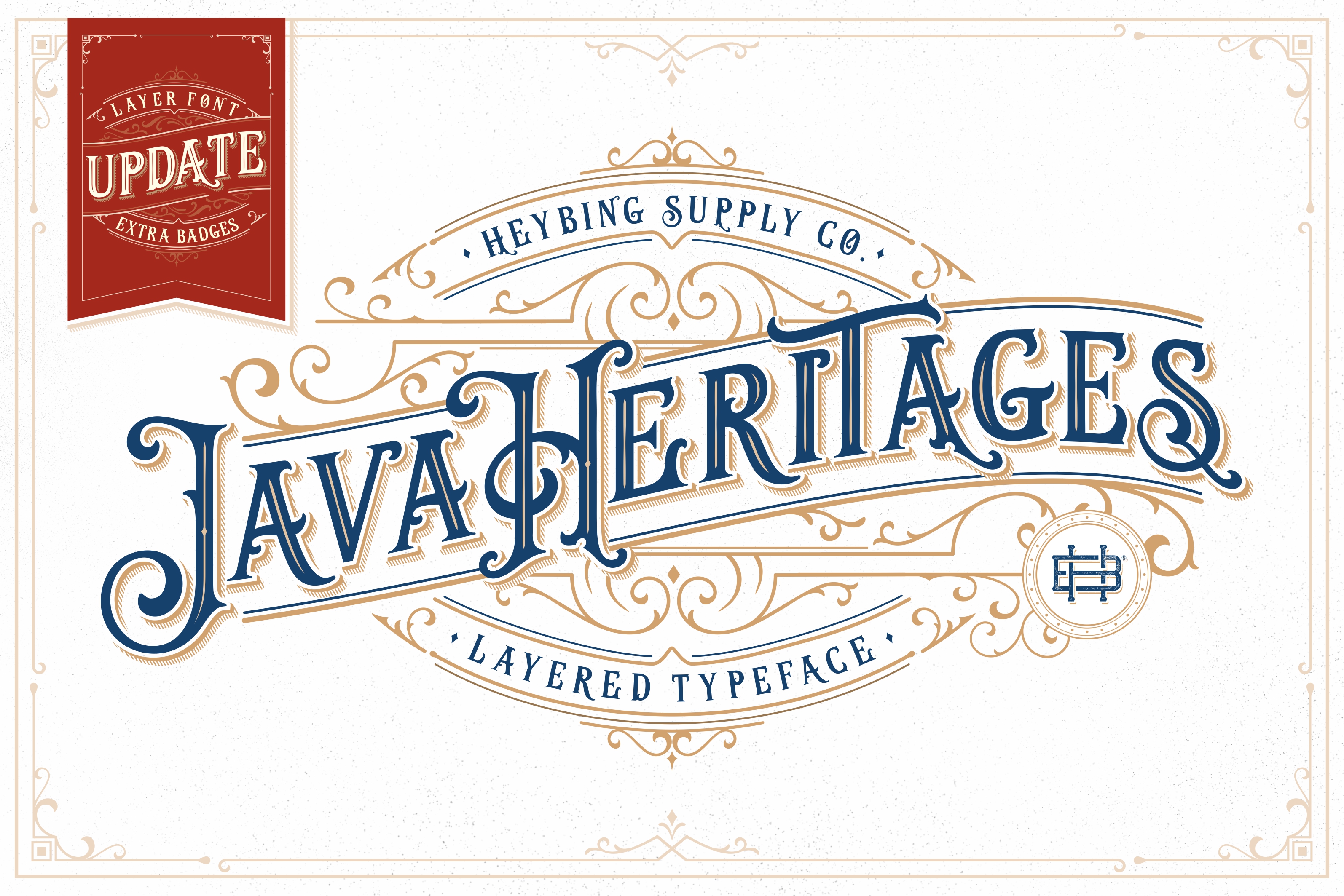
If you’ve come across Java Heritages, you already know it’s more than just another display font. This set delivers a striking vintage aesthetic with multiple styles and extras — perfect for packaging, posters, branding, social graphics, and anything that needs a dash of old-world charm. But like any specialized tool, using it effectively requires understanding what it is and what it isn’t. Many designers — from beginners to seasoned professionals — make choices that diminish the font’s impact, waste time, or cause unneeded frustration. This article walks through the most common missteps so you can get the best results without the headaches.
Common Mistake One: Treating Java Heritages as a Body Text Font
Java Heritages is a display font. That means it’s designed to grab attention, not to be read in long paragraphs. The intricate letterforms, high contrast, and ornamental details make it beautiful at large sizes but tiring at small sizes. Using it for body copy in a brochure or website often leads to poor legibility and readers skipping your message entirely.
Better approach: Reserve Java Heritages for headlines, subheads, pull quotes, logos, or short taglines. Pair it with a clean, neutral sans-serif or serif for the body text. For example, use Java Heritages for a product name on a label and a simple sans-serif for ingredients and instructions. This lets the vintage character shine without sacrificing readability.
Overloading a Design with Too Many Styles from the Set
A common temptation is using multiple styles from the Java Heritages collection — inline, outline, shadow, alternate characters, swashes — all in one layout. The result often looks busy, uncoordinated, and confusing. The extras are meant to add occasional flair, not to compete with each other.
What usually goes wrong: When every word or letter has a different style, there’s no visual hierarchy. The eye doesn’t know where to look first, and the vintage feel becomes chaotic rather than charming.
Practical fix: Pick one primary style for your main message (for instance, the regular version) and use a single additional style sparingly for emphasis — like a swash initial cap or a shadow version for a secondary element. Consistency builds trust and makes the font work for you, not against you.
Ignoring Kerning and Spacing
Display fonts, especially those with decorative shapes, often require manual adjustment of letter spacing and kerning. Java Heritages is no exception. Relying solely on default spacing can lead to uneven gaps — some letters feel too tight, others too loose.
Example: The uppercase "W" followed by "A" might look perfect, but "W" and "V" can create an odd gap. Similarly, ornate swash tails can bump into adjacent characters if you don’t adjust.
How to avoid this: After applying the font, zoom in and scan each word. Adjust kerning pairs manually in your design software (most professional tools allow this). Also check overall tracking for headlines — a slight increase often improves readability, while a decrease can make the design feel too cramped. Spend a few extra minutes, and your final output will look polished rather than amateur.
Downloading from Untrustworthy Sources
Java Heritages is a commercial font set, and like many popular typefaces, it is widely copied or offered for free on dubious sites. Downloading from such sources often means getting an incomplete set — missing styles, broken characters, or no OpenType features. Worse, some downloads contain malware or spyware disguised as font files.
Effect on your work: Missing glyphs or broken rendering can ruin a project. You might spend hours troubleshooting why a certain swash doesn't appear, only to realize the file is faulty. Your brand or client’s reputation suffers if the final print shows ugly rectangles or misaligned characters.
Safe choices: Always get Java Heritages from the official foundry or reputable font marketplaces (like MyFonts, Creative Market, or Fontspring). Check that the listing clearly states the number of styles, includes previews of all characters, and mentions OpenType support. The small extra cost is nothing compared to the time and frustration of fixing problems later.
Overlooking License Restrictions
A less obvious mistake is ignoring the fine print of the font license. Java Heritages may come with different licensing tiers — personal use, desktop, web, app, or commercial. Using a personal-use license for a client project or a commercial website can lead to legal issues or unexpected fees.
Why this matters: Font foundries rely on licensing to sustain their work. If you use the font beyond what the license allows, you risk receiving a cease-and-desist letter, having your site disabled, or paying hefty penalties. This is especially common for small business owners who assume "bought once" means "use anywhere."
Better practice: Before you download, read the license summary. Ask yourself: Will this be used in a logo for a paying client? Will the font be embedded on a website? Do I need to share it with a printer or a developer? Then choose the appropriate license. If you're unsure, contact the seller — most are happy to clarify. Keeping a record of your license purchase also helps if you ever need to prove your rights.
Forgetting Your Audience and Context
Java Heritages has a strong vintage personality that may not suit every brand or message. Using it on a modern tech startup’s website or a medical brochure can feel mismatched and confuse viewers. The font’s nostalgic character works best when the content aligns with its era — think craft breweries, retro diners, heritage brands, artisanal products, or event posters with a classic theme.
An example that works: A boutique coffee roastery using Java Heritages for its bag labels and signage communicates tradition and quality. The ornamentation supports the story. Contrast that with a software company selling AI tools — the same font would likely contradict the brand's futuristic image.
How to decide: Before choosing Java Heritages, ask whether the font reinforces your message or fights it. Think about your audience’s expectations. If the design requires timeless elegance or a vintage feel, this font is a strong candidate. If you need neutrality or modernity, consider using it only as a decorative accent or look for a different typeface altogether.
Neglecting to Test in Different Sizes and Mediums
What looks stunning on screen at 72pt may lose its charm when printed small or viewed on a mobile device. Many designers skip testing, assuming the font will scale flawlessly. Ornate details in Java Heritages can blur or break at small sizes, especially on lower-resolution screens or with certain printing methods.
What to do instead: Create a simple test document with your intended text at the sizes you plan to use — both smaller and larger. Test on at least two devices (desktop and mobile) and if possible, print a sample using the actual printing process (inkjet, laser, letterpress, etc.). Check that fine details like serifs, swashes, and thin strokes remain clear. Adjust if necessary before finalizing the design.
Hesitating to Combine with Modern Elements
Some designers go too far in the other direction: they use Java Heritages exclusively and avoid any modern touches, resulting in a look that feels dated rather than tastefully retro. The best vintage-inspired designs often blend old and new — for example, pairing the font with a clean grid, contemporary photography, or a muted color palette.
How to balance: Treat Java Heritages as the anchor for your vintage flavor. Then bring in modern layout principles, generous white space, and perhaps a simple sans-serif for secondary text. This creates contrast and makes the vintage elements pop without overwhelming the viewer. It also ensures the design feels intentional, not accidental.
Better Practices for Java Heritages
Using Java Heritages well is a matter of respecting its nature as a display font, choosing quality sources, reading the license, and always keeping the audience in mind. Take time to adjust spacing, limit the number of styles in a single piece, and test across contexts. When applied thoughtfully, this font set can elevate your design work and connect with viewers through its warm, nostalgic character. Avoid these common pitfalls, and you’ll not only save yourself time and money — you’ll create designs that look crafted, credible, and genuinely memorable.